
Case Studies
In-depth analysis of testing strategies applied to real-world projects — from requirements analysis to manual testing and automation scripting.
Sistem Reservasi Aurora Beauty Salon
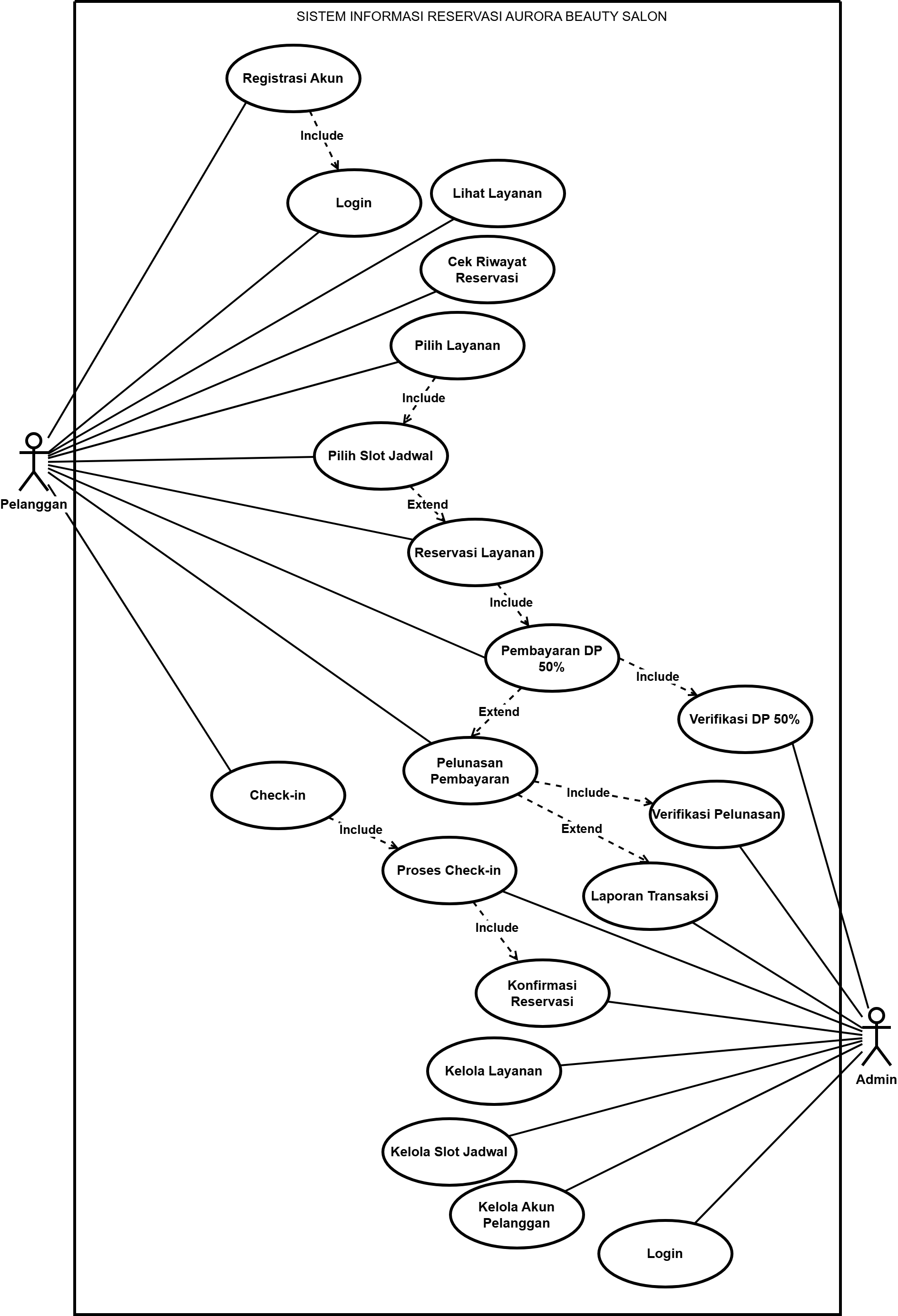
Web-based reservation information system with a two-stage transaction flow: 50% down payment (DP) upon booking, and final payment after the service is completed. Each payment stage undergoes admin verification, and customers must check-in upon arrival at the salon before the service begins.
Technical Insight:
Based on the users
table structure (columns two_factor_secret,
remember_token),
this system is built on Laravel with Jetstream/Fortify auth scaffolding — highly relevant for testing cookie-based sessions and 2FA features.
User Stories
As a Customer
As a customer, I want to register and login so that I can access the reservation services.
As a customer, I want to view the service list so that I can choose the desired treatment.
As a customer, I want to check my reservation history so that I know my past bookings status.
As a customer, I want to select a service and time slot so that my reservation fits my schedule.
As a customer, I want to pay a 50% down payment so that my reservation is confirmed without full upfront payment.
As a customer, I want to check-in upon arrival at the salon so that the admin knows I've arrived on time.
As a customer, I want to complete the final payment after the service is done so that my transaction is settled.
As an Admin
As an admin, I want to verify down payments and final payments so that no fraudulent transactions pass through.
As an admin, I want to confirm customer arrivals so that services are only provided to legitimate customers.
As an admin, I want to view transaction reports to monitor business performance.
As an admin, I want to manage service data, time slots, and customer accounts so that system information is always accurate.
Use Case Diagram
Activity Diagram — Main Business Flow
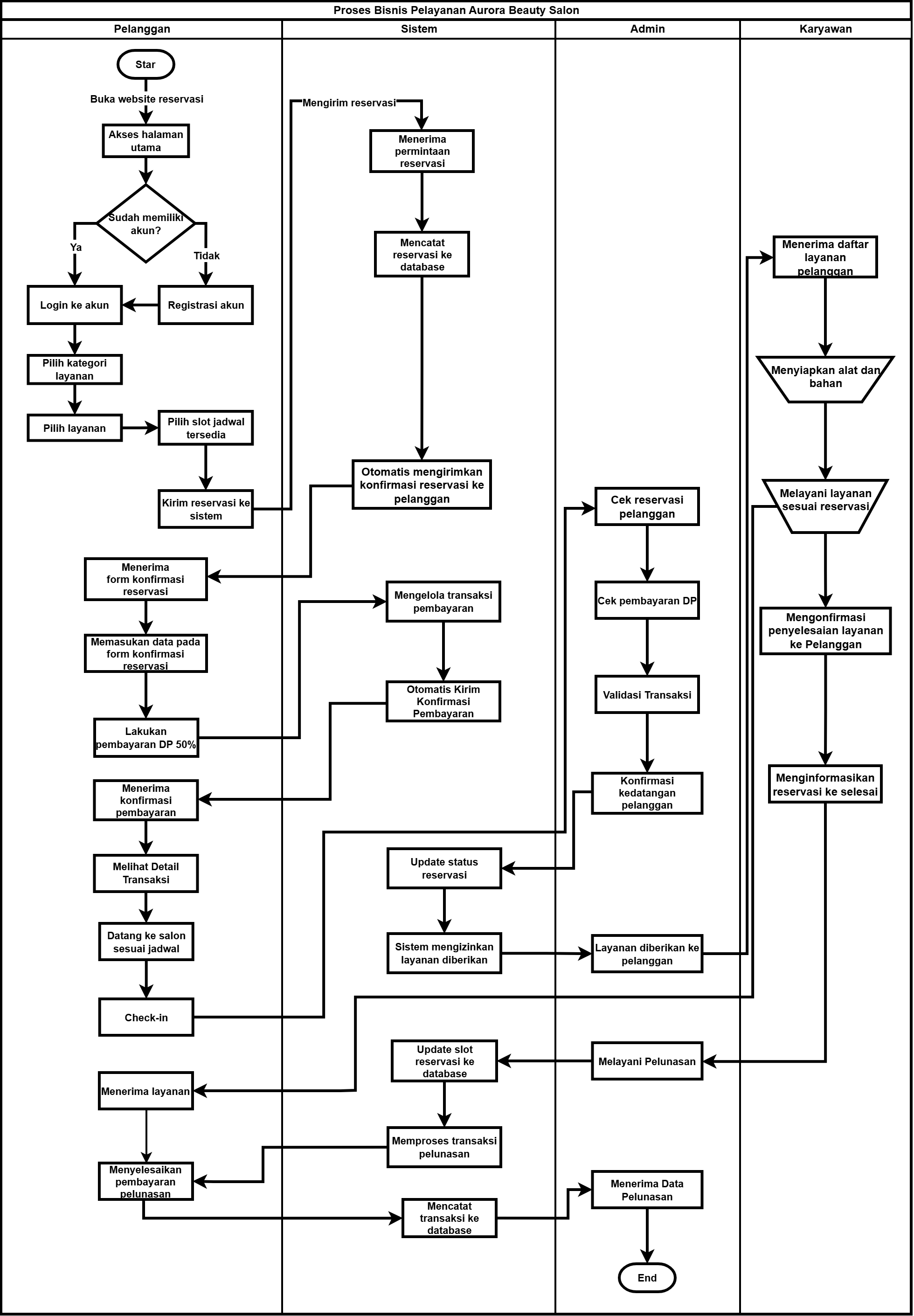
Employee Role Note: Employees do not appear as system actors in the Use Case Diagram (likely not accessing the system directly), but they play a crucial role in the real business process — preparing tools/materials and executing services. This is important for QA: validating that the "service provided" status in the system truly synchronizes with actual conditions on the ground.
Manual Testing — Black Box Testing
| Module | Scenarios | Match (Sesuai) | Not Match | Result |
|---|---|---|---|---|
| A. Authentication & Security | 13 | 13 × 5 = 65 | 0 | 100% |
| B. Admin | 18 | 18 × 5 = 90 | 0 | 100% |
| C. Customer | 18 | 18 × 5 = 90 | 0 | 100% |
| TOTAL | 49 | 245 | 0 | 100% |
System declared Valid for Implementation — 100% scenarios matched across all modules
Sample Test Cases (Authentication Module)
| Ref | Step by Step | Expected Result | Status |
|---|---|---|---|
| 1 | Customer Registration (Valid & Verified) — Fill complete form → Submit | "Email Verifikasi Terkirim" notification appears & user receives verification email | PASS |
| 2 | Customer Registration (Duplicate Email) — Register with an already-used email | System rejects registration and shows "Email sudah terdaftar" message | PASS |
| 3 | Customer Login (Valid Credentials) — Enter valid email & password → Click login | Redirected to customer dashboard | PASS |
| 4 | Customer Login (Invalid Password) — Enter valid email with wrong password | Error message displayed, stays on login page | PASS |
Automation Testing — Playwright + Page Object Model
E2E automation covering the Main Menu flow (guest/customer navigation, language switcher, profile sidebar panel, AJAX-driven Home page) plus Registration, Login, and a full Booking → Payment flow against a real Midtrans Sandbox integration. Built with Playwright using the Page Object Model pattern and a dedicated, idempotent test account so runs never touch real customer data.
| Group | Focus | Tests |
|---|---|---|
| A | Main menu navigation (guest) | 5 |
| B | Language switcher (ID/EN) | 6 |
| C | Guest vs. logged-in customer state | 4 |
| D | Profile sidebar panel & logout confirmation | 10 |
| E | Service search (autocomplete) | 8 |
| F | Service category grid (AJAX) | 3 |
| G | "Experience" gallery (AJAX) | 1 |
| H | Recommendation carousel (AJAX) | 3 |
| I | Customer registration (real form + validation) | 5 |
| J | Customer login (valid/invalid credentials, unverified account) | 4 |
| K | End-to-end: register → verify → login → book → pay (Midtrans Sandbox) → history | 2 |
| TOTAL | 51 | |
Page Object Model — every locator lives once in pages/, reused across all test files.
Reused login session — customer login runs once in auth.setup.js, saved as Playwright storageState and reused by every test that needs an authenticated customer.
Isolated test data — a dedicated, idempotent customer account is seeded via a PHP script that never touches real customer rows.
DOM-based assertions — checks like "grid finished loading" assert on element structure/count, not on placeholder text, so tests don't break when the active language changes.
Self-cleaning test data — registration and full-flow tests create a uniquely-emailed account per run and delete it in afterEach via a small PHP helper, so the dev database never accumulates leftover test accounts.
Page Object — Main Menu
Test — Service Search Autocomplete (Debounce Edge Case)
Newest coverage: full Booking → Payment E2E (Group K)
The suite now drives the entire funnel with a single, disposable test account:
register → verify email (via DB) → login → pick a
category & service → choose a schedule → checkout → pay → success page → booking history,
asserting the final reservation shows up as is_lunas: true.
Payment strategy: the app's Midtrans integration runs on real
sandbox credentials. The test captures the Snap token from the app's own
/booking/midtrans/proses endpoint, waits for the
genuine Snap iframe to open and asserts it's served from sandbox.midtrans.com
— proving the integration is really wired up — then completes the transaction by calling
/booking/midtrans/callback directly, the same endpoint Snap.js's
own success callback calls in production. Snap's payment-method UI is a third-party
widget that renders non-deterministically between runs, so this still exercises the
app's real backend logic (validation, status update, response) without depending on
a flaky third-party UI.
Test — Booking → Payment E2E (Midtrans Sandbox)
Finding — test assumption vs. product bug:
on the first run, 2 of 41 tests failed. Investigation showed
config/app.php
hardcodes 'locale' => 'id'
instead of reading env('APP_LOCALE'),
so the app always defaults to Indonesian regardless of .env.
The app's own behavior was consistent — only my test's expectation was wrong. Fixed on the test
side with a single DEFAULT_LOCALE
constant, without touching application code, and reported the distinction explicitly.
QA Learnings & Notes
State Inconsistency
The two-stage payment flow (DP → Final) is prone to state inconsistency if admin verification is missed — crucial to ensure reservation status cannot "skip" to the next phase.
Employee Involvement
Employees are not system actors, so validating "service provided" relies on manual admin/system input — a critical point worth testing with negative scenarios.
Double Booking
Double booking prevention on time slots is a critical area, especially for concurrent request scenarios (two customers booking the same slot simultaneously).
Task Module — Manual Testing & Bug Report
QA testing on a Task management module covering CRUD operations, form validation, notification systems, and filter functionality. Discovered 15 bugs including 2 Major severity issues, with detailed bug reports for each finding.
Sample Test Cases (Task Module)
| Ref | Step by Step | Expected Result | Actual Result | Status |
|---|---|---|---|---|
| 1 | Login to platform as Operator | Successfully login using credential provided | Successfully login using credential provided | PASS |
| 2 | Check if Task menu exists on the menu list | Task menu is between Student and Mailbox menu | Task menu is between Companies and Mailbox menu | N/A |
| 2 | Verify menu label in both languages (EN/FR) | [EN] Tasks, [FR] Tache | [EN] Tasks, [FR] Taches | WARNING |
| 3 | Navigate to Task menu and check table display | List of Task table displayed once clicked | List of Task table displayed once clicked | PASS |
Bug Report Highlights
| Bug ID | Module | Severity | Summary |
|---|---|---|---|
| BUG_004 | Task - Notification | Major | TASK_N5 notification not received — task assignment notification never delivered |
| BUG_014 | Task - Detail Pop-up | Major | Detail pop-up does not open for tasks with "Done" status |
| BUG_001 | Task - Add Task | Medium | Mandatory Class field has no red state or required message when left empty |
| BUG_012 | Task - Add Task | Medium | Past dates are selectable as Due date — no validation on date picker |
| BUG_013 | Task - Add Task | Medium | User search by First name not working — only Last name returns results |
| BUG_005 | Task - Menu | Minor | French labels show "Taches / Ajoute une tache" — plural inconsistency |
Showing 6 of 15 bugs — download the full report below for complete details
Bug Report Example — BUG_001
BUG_001
Medium
Mandatory Class field does not turn RED and shows no 'required' message when it is left empty
1. Access the platform URL
2. Login with operator credentials
3. Navigate to Task → Add Task
4. Leave the "Class" field empty
5. Try to submit the form
Field turns RED with a "required" validation message
Field does not change color and no message is displayed
Permanent — occurs every time